
I want to be clear about something before we get into the wins.
This system did not work the way I expected when I first built it. Several things broke in ways that were embarrassing and time-consuming to debug. At least one broke in production: meaning I published something that should have been caught. I’m going to walk through all of it, because the honest account of what broke and how I fixed it is more useful than a polished tour of what works.
That’s the actual lesson from six months of running this weekly: every failure became a permanent improvement. The system today is smarter than it was in February because each mistake turned into a directive update. If you’re going to build something like this, you should know what you’re walking into.

[Part 4 of the 5-part blog series]
If you missed the intro post I Stopped Writing My Newsletter. An AI System Does It Now., that’s the right place to start. It covers the full system at a high level and explains why I built it the way I did.
Part 1 covers the directive and the 3-layer architecture.
Part 2 covers the skill and how one command drives everything.
Part 3 covers the four specialist agents and the human review step.
What the System Actually Produces Each Week
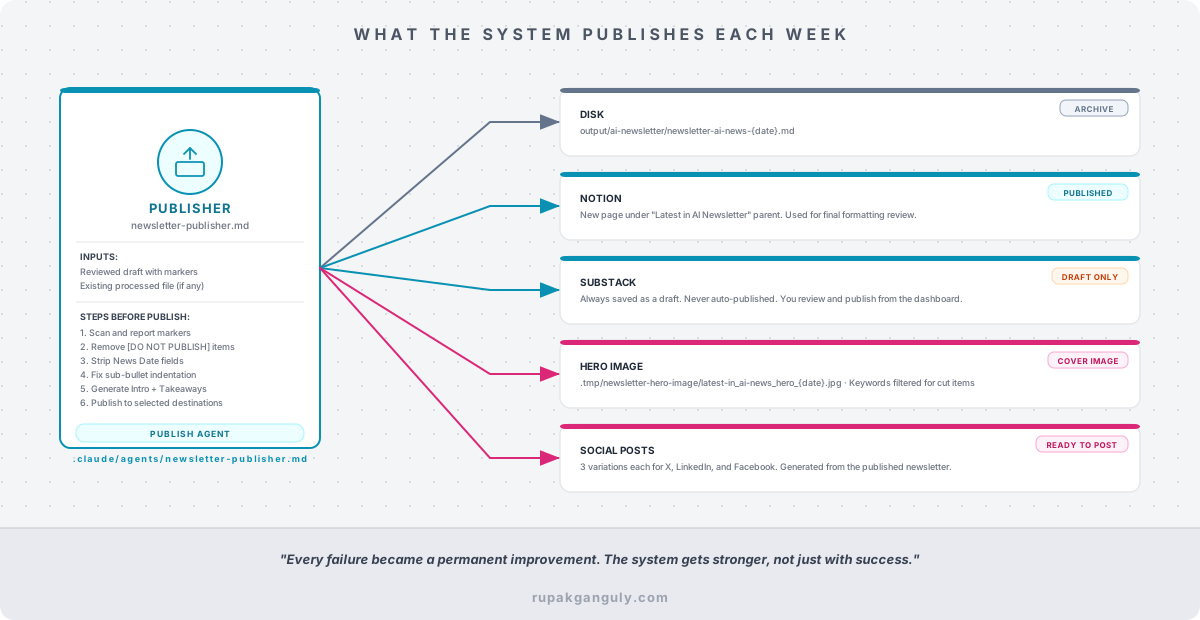
Before the failures, here’s what the pipeline generates on a good week, and why each output exists.
[What the System Actually Produces Each Week]
The Draft
The draft lives in .tmp/newsletter-writer/newsletter-content-{date}.md. This is the file I read and edit. It contains everything the writer agent produced: all four sections, 20+ news items with their headlines and summaries, the full bullet detail, News Date fields for every item so I can verify recency, and placeholder comments where the Introduction and Key Takeaways will go. The [NEW ITEM] and [DO NOT PUBLISH] markers are visible and ready to edit.
This file is deliberately messy. It’s a working document, not a publishable one. The **News Date: 2026-07-18** fields that sit above every headline look cluttered, and they’re supposed to. If I’m reading the draft and a date is wrong or missing, I want to see it, not have it stripped before I can verify it.
The Processed File
After I edit the draft and run the publisher, the processed file at .tmp/newsletter-publisher/newsletter-content-processed-{date}.md gets created. The markers are gone. The [DO NOT PUBLISH] items are removed entirely, not just hidden, but deleted from the document. The date fields are stripped. Sub-bullet indentation is normalized from 2 spaces to 4 (more on why that matters below). The Introduction and Key Takeaways are generated from whatever is in the final edited content at that point.
This file is the source of truth for every downstream destination. If I publish to disk first and then decide to push to Notion two hours later, the publisher finds this processed file and uses it. The Notion page and the disk file are identical. There’s no version drift.
The Final Outputs
- Disk: the output is stored at
output/ai-newsletter/newsletter-ai-news-{date}.md, a clean Markdown file that I use as the canonical archive and as source for my website - Notion: A new page under the “Latest in AI Newsletter” parent which I use as the working draft for final formatting before publishing from the Substack dashboard
- Substack: Always saved as a draft, never auto-published. I review it in the Substack editor, adjust the cover image, add tags, add buttons and publish manually. The “publish” step in the pipeline is intentionally incomplete
- Hero image: It is generated at
.tmp/newsletter-hero-image/latest-in_ai-news_hero_{date}.jpg, a composited cover image overlaid with the date, tag line and keywords over a rotating base photo
The Honest Failures
Failure 1: Python Agent Boilerplate
The original version of this system had Python agents. Actual Python classes that wrapped the Claude API, managed prompts, and called tools. I was treating Claude like a service endpoint and writing glue code around it.
The agents were 200–300 lines each. They needed to be installed, maintained, and tested. They had their own error handling. Every time the prompt logic needed to change, I was editing Python, not Markdown. It also necessitated using the Anthropic API and not use my paid Claude Pro subscription.
Eventually, I also realized I was writing abstractions around a tool that already handles abstraction natively. Claude subagents, defined as Markdown files in .claude/agents/, eliminated every line of that boilerplate. The researcher, writer, publisher, and hero image agents are now four Markdown files totaling maybe 600 lines combined. No Python. No API calls to manage. No class hierarchies.
The lesson wasn’t “Python is bad.” The lesson was: if you’re writing code to make an LLM do something, check whether the LLM can already do it directly.
Failure 2: Notion Sub-Bullet Indentation
The newsletter uses nested bullets: main items with 2-3 sub-bullets for context. For weeks, these looked right in the draft file but wrong in Notion and Substack. Sub-bullets were rendering at the same depth as top-level bullets. Everything was flat.
At first, I was manually editing and fixing the indentations in Notion. Then I got tired and fixed the directive.
The problem: the writer agent was using 2-space indentation for sub-bullets, which is correct Markdown in most contexts. Notion and Substack require 4-space indentation to recognize nesting. Two spaces looks correct in a Markdown preview and fails silently in production.
Once I understood the issue, the fix took five minutes. I added a pre-publishing step to the publisher agent: convert all 2-space sub-bullet indentation to 4-space before writing any output. I updated the directive to document why the conversion exists.
That bug never happened again. Not because I’m more careful now, but because the system is incapable of producing the wrong indentation. That’s the difference between remembering to fix something and making it impossible to break.
Failure 3: Duplicate News Items Between Weeks
Early on, the researcher agent had no memory of what it had published before. It was scoring articles by relevance and recency, and a well-written article about a major model release could stay highly relevant for two or three weeks after it first ran.
I noticed it when a subscriber mentioned they’d seen an article in the previous edition. I went back and checked. The researcher had surfaced the same article because it was still the top result for its category.
The fix: the researcher’s first action is now to read the most recent processed newsletter from .tmp/newsletter-publisher/. It extracts every headline that ran in the previous edition. Those headlines are excluded from the new research, even if they’re the top result.
This seems obvious in retrospect. It wasn’t obvious at design time. It took a live failure to surface the gap.
Failure 4: Hero Image Keywords for Removed Items
This one I noticed myself before a subscriber did, but only barely.
The publisher generates hero image keywords from the newsletter’s header. If an item has a keyword like “GPT-5” and I remove the item with [DO NOT PUBLISH], the keyword still appears in the header, and therefore on the hero image. I’d published a cover image that mentioned a topic that wasn’t in the newsletter.
The hero image agent now runs a keyword filter before compositing. It reads both the raw keyword list from the header and the final newsletter content. If a keyword doesn’t appear in the content, it gets removed from the header before the image is generated. The cover image reflects what was actually published.
Failure 5: Introduction and Key Takeaways Generated Too Early
The first version of the writer agent generated everything: research formatting, news items, and the Introduction and Key Takeaways in a single pass.
The problem: I often edit the draft significantly after the writer finishes. I cut items. I add items. I restructure sections. When I’d publish, the Introduction would describe a newsletter that no longer existed in quite the way it was written.
The solution is the design you see in Part 3: the Introduction and Key Takeaways are placeholders in the writer’s output (<!-- PLACEHOLDER: INTRODUCTION -->) and are generated by the publisher agent from the final, human-reviewed content. The publisher generates them last, after markers are processed and items are finalized.
This means the Intro always matches the newsletter. It has to: it’s generated from the newsletter that actually gets published.
[Before and After Time Comparison]
The Self-Annealing Principle
Here’s the pattern across every failure above:
- Something broke.
- I read the error and understood why.
- I fixed the agent or script.
- I updated the directive to document the new rule.
- The system became permanently incapable of making that mistake again.
I call this self-annealing. Every break is a directive update. Every directive update closes a gap. The system gets stronger with each failure, not just with each success.
The opposite of this is a system that requires you to remember to do things correctly. Human memory is unreliable. Directive-enforced behavior is not. When I add “check the previous newsletter before researching” to the directive, that rule runs every week without me thinking about it.
This is also why I update the directive immediately when something breaks, not after I’ve finished everything else, not in a cleanup pass at the end. The directive is the memory of the system. If I don’t write it down, the system doesn’t know.
This Isn’t About Newsletters
The reason I’ve spent four posts documenting this is not because newsletter automation is inherently interesting. It’s because the pattern is reusable.
The same three-layer architecture (directive, orchestration, execution) applies to any repeating workflow where a human needs to make judgment calls in the middle and the rest is mechanical overhead.
Some places I’d use it:
- Weekly team briefing or executive summary: Researcher gathers signals from Slack, Linear, and GitHub. Writer formats them into a structured summary. You review and cut what’s internal-only. Publisher sends to the distribution list.
- Competitive intelligence report: Researcher monitors competitor announcements, pricing pages, and job postings. Writer produces a structured diff from last week’s report. You decide what’s worth flagging to the sales team.
- Content calendar management: System drafts ideas from trending topics in your space. You approve, edit, or add items. Publisher formats them into a Notion database with status fields and scheduled dates.
- Customer research digest: Researcher aggregates support tickets, NPS comments, and review sites. Writer surfaces patterns. You decide which ones become product priorities.
The questions before you start are always the same:
1. What is the SOP? Write the directive before you build anything. If you can’t describe the process clearly enough to hand it to a new employee, you don’t understand it well enough to automate it. The directive is the forcing function that makes you articulate your own process.
2. Who are the specialists? Design agents with tight scope. One job each. Clear inputs and outputs. An agent that does everything also fails at everything, and the failures are hard to diagnose because the error surface is everywhere. When each agent has a single responsibility, failures are loud and localized.
3. Where does a human stay in the loop? This is the most important question and the one most automation frameworks skip. Design the review step deliberately. Decide exactly where in the pipeline a human sees the output, makes decisions, and confirms before execution continues. Automation without a human checkpoint isn’t fully autonomous, it just fails silently.
AI Is the Tool. You’re the Editor.
Every week, I read the draft. I read every news item. I cut the ones that aren’t worth my readers’ time. I add the ones the system missed. Sometimes the draft is excellent and I confirm it immediately. Sometimes I make ten edits. The system doesn’t know which it is until I decide.
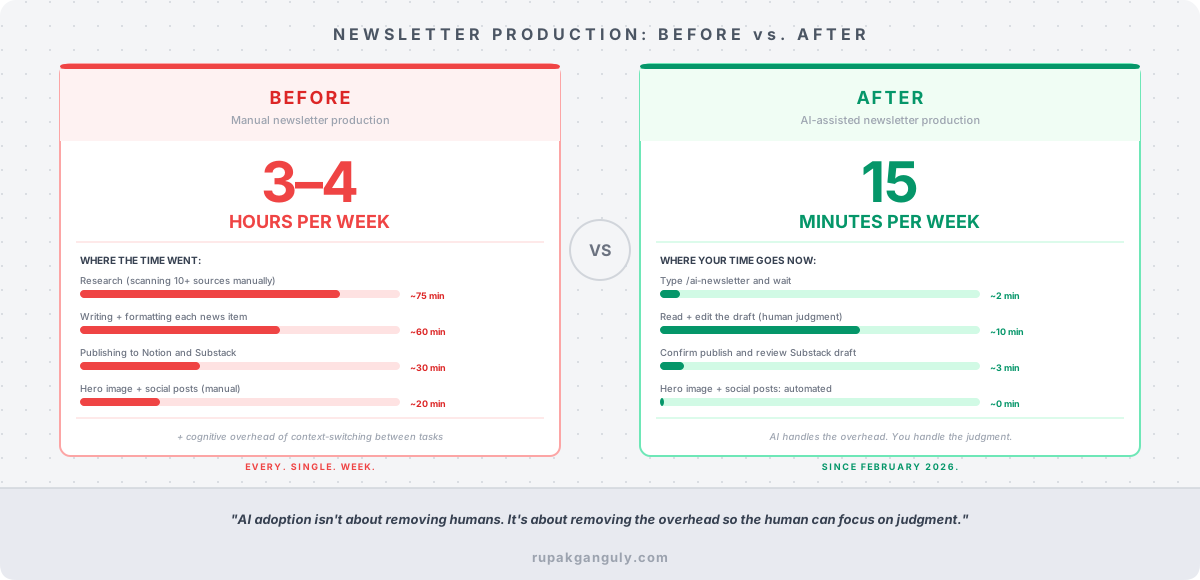
The newsletter still sounds like me because I’m still in it. The AI handles the mechanical overhead: the research, the formatting, the publishing logistics, the cover image, the social posts. I handle the editorial judgment that determines what goes out under my name.
That’s the right distribution of work. Not “AI does everything” and not “AI is a fancy autocomplete.” AI handles the parts that are repeatable and mechanical. You handle the parts that require judgment, taste, and accountability.
If you’re running any repeating workflow, weekly or otherwise, that feels like a second job, the question isn’t whether AI can help. It’s whether you’ve designed the system clearly enough to hand it over. Write the directive first. You might be surprised how much clarity that alone creates.
If you missed the intro post I Stopped Writing My Newsletter. An AI System Does It Now., that’s the right place to start. It covers the full system at a high level and explains why I built it the way I did.
Part 1 covers the directive and the 3-layer architecture.
Part 2 covers the skill and how one command drives everything.
Part 3 covers the four specialist agents and the human review step.
This is the final part of the series. Hope you enjoyed the series.
Subscribe to the newsletter this system produces at rupakganguly.substack.com. If you’re building something similar or have questions about the architecture, I read everything.