
The directive tells the system what to do. But a directive sitting in a file doesn’t run anything. You need something that activates it. Something you can type once and walk away from.
That’s what a skill is.
In Claude Code, a skill is a Markdown file that lives in .claude/skills/. It defines commands, routes work to agents, and holds the workflow logic. When you type /ai-newsletter, Claude reads that file, figures out what you want, and starts making decisions. You don’t touch any code. You don’t configure any pipeline. You just type the command.
The difference between a prompt and a skill is the difference between a one-shot request and a repeatable, stateful workflow manager. A prompt is “write me a newsletter.” A skill is a system that knows where to look for existing work, what to do based on what it finds, and how to route the right task to the right agent depending on context.

[Part 2 of the 5-part blog series]
If you missed the intro post I Stopped Writing My Newsletter. An AI System Does It Now., that’s the right place to start. It covers the full system at a high level and explains why I built it the way I did.
Part 1 covers the directive and the 3-layer architecture.
The Command Map: Ten-Plus Commands from One Entry Point
The /ai-newsletter skill accepts sub-commands. Here’s the full map:
| Command | What it does |
|---|---|
/ai-newsletter |
Full workflow: research → write → user review → publish |
/ai-newsletter research |
Gather news only, stop before writing |
/ai-newsletter write |
Format newsletter from saved research |
/ai-newsletter publish disk |
Generate Intro and Takeaways, save to disk |
/ai-newsletter publish notion |
Generate Intro and Takeaways, push to Notion |
/ai-newsletter publish substack |
Save newsletter as a Substack draft |
/ai-newsletter publish both |
Publish to disk and Notion |
/ai-newsletter publish all |
Publish to disk, Notion, and Substack draft |
/ai-newsletter week "2026-07-18" |
Run the full workflow for a specific Friday |
/ai-newsletter hero "kw1, kw2" |
Regenerate the hero cover image with custom keywords |
/ai-newsletter help |
Show the usage guide |
Natural language works just as well. “Generate this week’s newsletter” triggers the full workflow. “Just research AI news” runs the researcher agent only. “Publish to Notion” routes to the publisher with Notion as the destination. “Add a new item about the OpenAI announcement, here’s the link” adds a [NEW ITEM] marker and queues it for processing. You don’t need to remember the exact command syntax. The skill interprets intent.
This matters more than it might seem. The people I’ve shown this to who are not engineers — content creators, operators, marketers — found the natural language interface more comfortable than memorizing slash commands. The skill handles both. Same routing logic underneath.
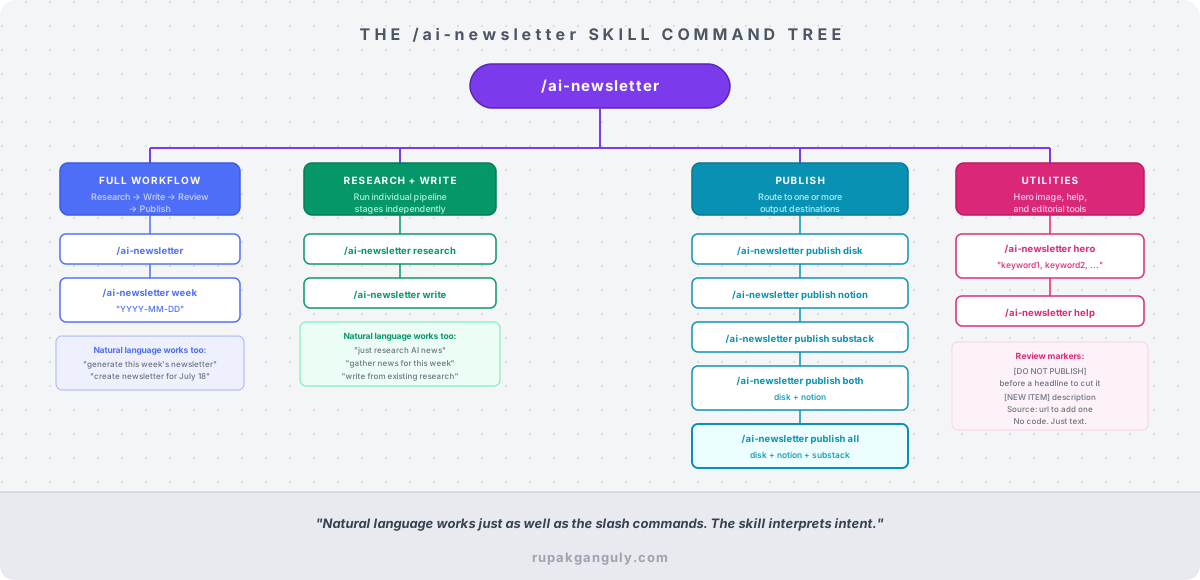
[The /ai-newsletter skill Command Tree]
The Draft-First Check: Preventing Wasted Work
Before running any agent, the skill checks for an existing draft.
This was not in the original design. I added it after running research twice in the same week because I forgot I’d already done it. That’s an expensive mistake when research involves 15-plus web searches across company blogs, research archives, and tech publications.
The check works like this:
- Look for a file matching
.tmp/newsletter-writer/newsletter-content-*.md - If a draft exists with
[NEW ITEM]markers — run the writer agent to process them, then stop - If a draft exists without markers — tell the user it’s ready for review or publishing, stop
- If no draft exists — run the full research and write workflow
That branching logic sits entirely in the skill file. No code. Just instructions Claude follows every time.
The result: you can close your laptop mid-workflow, come back two days later, type /ai-newsletter, and the system picks up exactly where you left off. It finds the draft, scans it, tells you what it found, and waits for you to confirm before doing anything.
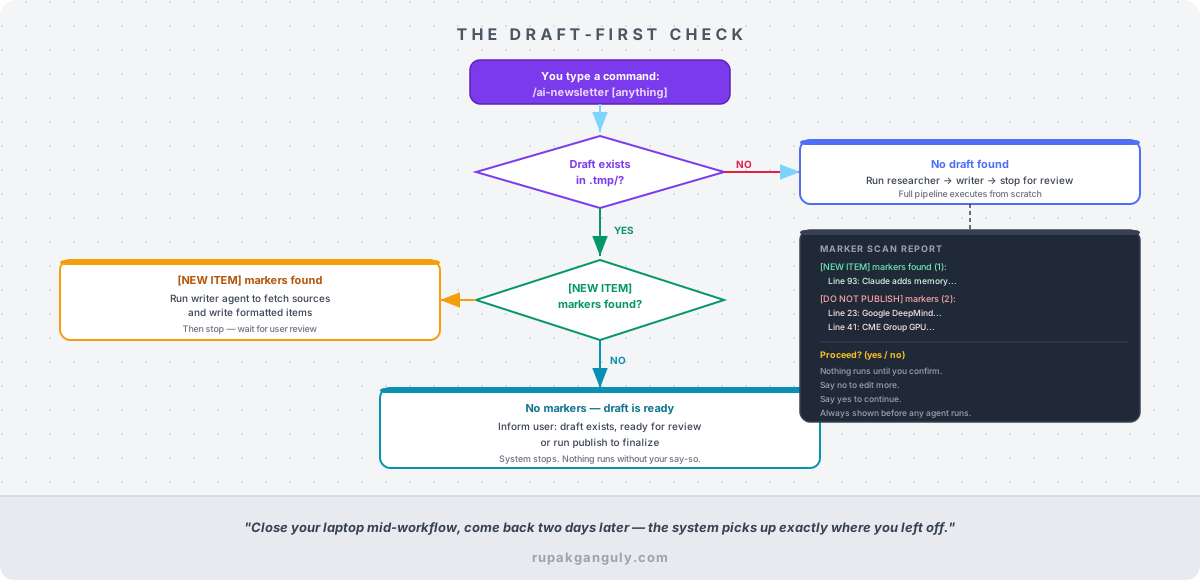
[Draft-First Check Flowchart]
The Marker System: Editorial Control in Plain Text
Two markers give you control over the draft without opening any tool other than your text editor.
[DO NOT PUBLISH] — place it at the start of any news item headline to exclude that item from the final newsletter. The publisher agent removes the entire item: headline, summary, all bullets. The marker never appears in what gets published to Notion, Substack, or disk.
[NEW ITEM] — place it on its own line with a description and a source URL:
- [NEW ITEM] OpenAI discontinued Sora video app to refocus on core models and enterprise. Source: https://...
The writer agent sees that marker, fetches the source URL, reads the article, and writes a properly formatted news item in the same structure as everything else in the draft. It replaces the marker with the finished item. You don’t write the item. You just point the agent at the source.
These markers survive file saves. You can add a [DO NOT PUBLISH] tag, save the file, go for a walk, come back, and it’s still there when you run publish. The system scans for them before doing anything and shows you a report before it proceeds.
Marker Scan: .tmp/newsletter-writer/newsletter-content-2026-07-18.md

[NEW ITEM] markers found (1):
  - Line 93: [NEW ITEM] Claude adds memory to projects. Source: https://...

[DO NOT PUBLISH] markers found (2):
  - Line 23: [DO NOT PUBLISH] Google DeepMind Co-Scientist Published in Nature...
  - Line 41: [DO NOT PUBLISH] CME Group GPU Index Launch...

Proceed? (yes to continue / no to cancel)
Nothing runs until you say yes. If you want to go back and edit the draft more, say no and the system waits.
The Routing Logic: How Decisions Actually Get Made
The skill file doesn’t contain Python. It contains instructions for Claude. Here’s what the decision tree looks like when you run /ai-newsletter publish disk:
- Find the latest draft in
.tmp/newsletter-writer/ - Read the file, scan line by line for literal strings
[NEW ITEM]and[DO NOT PUBLISH] - Display the Marker Scan Report
- Wait for user confirmation
- If
[NEW ITEM]markers exist: invoke the writer agent first to process them - Invoke the publisher agent with destination: disk
- The publisher checks for an existing processed file in
.tmp/newsletter-publisher/— if it exists, use it directly and skip re-processing - If no processed file: process markers, generate Introduction and Key Takeaways, save the processed file
- Save final newsletter to
output/ai-newsletter/
Step 7 is worth noting. If you’ve already published to disk and now want to push to Notion, the publisher doesn’t reprocess the newsletter from scratch. It finds the already-processed file and uses it. That means the Intro and Takeaways are identical across destinations. No drift between the Notion version and the Substack version.
Why This Matters for Non-Engineers
I want to be direct about something: most people who could benefit from this pattern won’t build it because they assume it requires engineering skills. It doesn’t.
The skill file is a Markdown document. The directive is a Markdown document. The agent definitions are Markdown documents. The configuration that makes all of this work is text that Claude reads and follows. There is no pipeline configuration UI, no YAML, no environment to set up beyond a .env file with API keys.
If you can write a standard operating procedure — a clear description of a repeating task, what it needs, what it produces, and what can go wrong — you can design a workflow like this. The skill is just the entry point. What’s underneath it is a set of documented rules that Claude enforces.
The engineering I did was writing those documents carefully. That’s the work. Not the code.
If you missed the intro post I Stopped Writing My Newsletter. An AI System Does It Now., that’s the right place to start. It covers the full system at a high level and explains why I built it the way I did.
Part 1 covers the directive and the 3-layer architecture.
In Part 3, I’ll walk through the four specialist agents that actually do the work: what each one owns, what tools it has access to, what it’s explicitly not allowed to do, and why the human review step sits in the middle of the pipeline rather than the end. The boundaries between agents are a design choice. Where those boundaries sit determines whether the system holds up at week 20 or quietly degrades by week 4.
If you want to see the newsletter this system produces, subscribe at rupakganguly.substack.com. If you’re building something similar or have hit a wall trying, drop me a message. I’d genuinely like to hear what broke.