
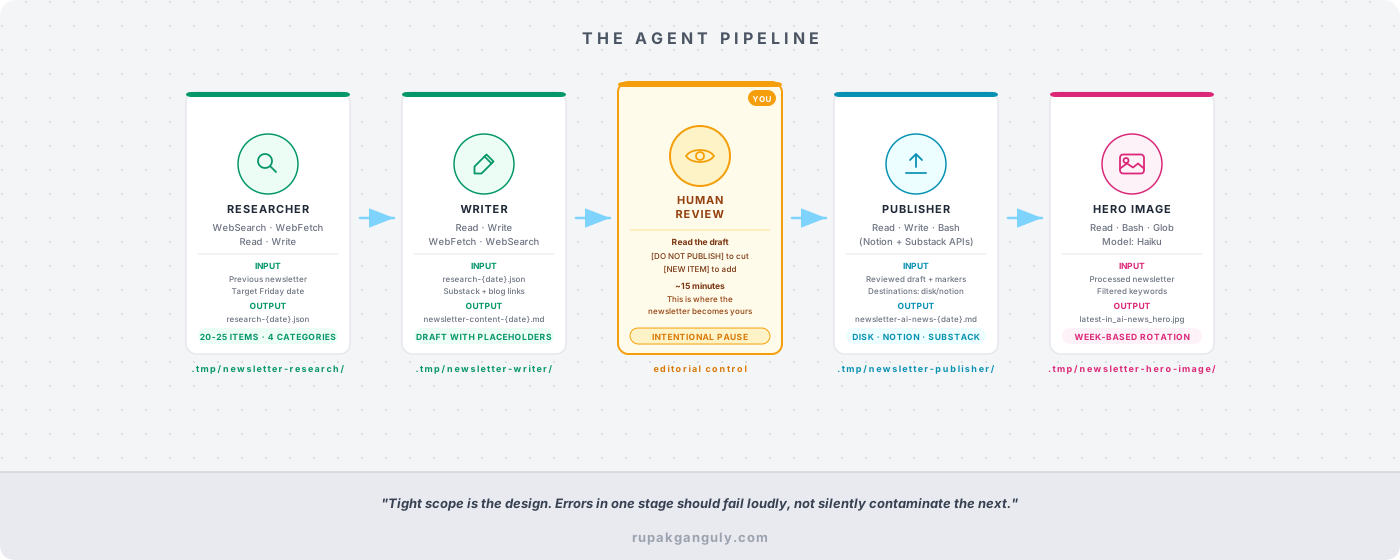
The directive defines the rules. The skill activates the pipeline. But the actual work — scanning the web, writing the newsletter, publishing it, generating the cover image — gets done by four specialist agents. Each one has a single job, a specific set of tools, and explicit limits on what it’s not allowed to touch.
That last part is the design insight that took me the longest to internalize. Giving an agent broad capabilities feels like giving it more power. In practice, it’s the opposite. An agent that does everything also fails at everything, because errors in one stage contaminate every stage that follows. The specialist model forces you to think carefully about what each step in the pipeline actually needs. And when something breaks, you know exactly where.

[Part 3 of the 5-part blog series]
If you missed the intro post I Stopped Writing My Newsletter. An AI System Does It Now., that’s the right place to start. It covers the full system at a high level and explains why I built it the way I did.
Part 1 covers the directive and the 3-layer architecture.
Part 2 covers the skill and how one command drives everything.
Why One Giant Prompt Fails
Early versions of this pipeline used a single agent that researched, wrote, and published in one pass. The failure mode was slow and hard to diagnose. The research stage would pull in a headline from three weeks ago. That old headline would get formatted into the newsletter. The newsletter would go out. I’d notice a week later.
There’s a compound accuracy problem here. If each stage of a five-step workflow has 90% reliability, the end-to-end success rate is around 59%. You can’t feel that degradation as it happens. You see the output, assume it’s correct, and move on.
Specialist agents fix this by giving each step its own quality checklist, its own scope, and its own opportunity to fail loudly instead of silently passing bad data to the next stage.
[The Agent Pipeline]
Agent 1: The Researcher
- File:
.claude/agents/newsletter-researcher.md - Tools: WebSearch, WebFetch, Read, Write
- Model: Sonnet
The researcher’s job is to find 20-25 categorized news items from the past week and save them as structured JSON. That’s it. It does not write. It does not format. It does not touch anything that already exists.
Before it searches for a single article, it reads the most recent processed newsletter from .tmp/newsletter-publisher/. It extracts every headline that ran in the previous edition. Then it excludes those items from the new research, even if there’s follow-up coverage. Readers who follow every week already saw them.
The date range enforcement is equally strict. Every item must have a published date within Saturday-to-Friday of the target week. Not “approximately this week.” Within the range. Items without a verifiable publication date get flagged as “N/A” but still have to pass a recency check. Without this rule, the researcher will surface articles from three weeks ago because they happened to rank well in a search.
The excluded sources list is another quality gate I added after experience: no Bloomberg, no Forbes, no Reuters, no individual LinkedIn posts unless from a verified author. “Use reputable sources” is too vague to enforce. An explicit exclusion list isn’t.
Output goes to .tmp/newsletter-research/research-{date}.json — a structured file with four category arrays: breakthroughs, tech moves, trends, and developer tools. The writer agent reads this file. The researcher never touches what the writer produces.
Agent 2: The Writer
- File:
.claude/agents/newsletter-writer.md - Tools: Read, Write, WebFetch, WebSearch
- Model: Sonnet
The writer takes the research JSON and formats it into the newsletter structure. Four sections, each news item with a headline, a summary paragraph, and up to three bullet points. Then it stops.
It deliberately leaves two sections blank. The Introduction and the Key Takeaways are placeholders — HTML comments that say “these will be generated by the publisher agent after user review.” This is intentional. If the writer generates the Introduction before I’ve edited the news items, the Introduction describes a newsletter I might change. Generating it last, from the final content, is the only way it stays accurate.
The writer also has a mandatory duplication review step. After writing all news items, it scans every item and checks whether the summary paragraph and the bullet points say the same thing. They serve different purposes: the summary is the “so what” and the bullets are the evidence. Without this check, LLMs default to restating the summary in bullet form, which reads as filler. The directive includes a bad example and a good example to make the rule concrete.
The writer fetches two live sources to populate the Related Articles section every week: the four most recent “Latest in AI News” editions from the Substack archive and AI-related blog posts from rupakganguly.com/tags/ai/. It interleaves them, checks which blog posts ran last week, and picks different ones. Posts older than one year are excluded automatically. I never curate that section manually.
When [NEW ITEM] markers exist in a draft, the writer runs in re-write mode: it reads the draft, fetches the source URL from each marker, writes a properly formatted news item in the same structure as everything else, and replaces the marker. It doesn’t regenerate the whole newsletter. Just the items I flagged.
Output goes to .tmp/newsletter-writer/newsletter-content-{date}.md with the placeholders intact and the [NEW ITEM] and [DO NOT PUBLISH] markers visible. That file is what I review. Full editorial control.
The Human Review Step (In the Middle, Not the End)
[The Human Review Step]
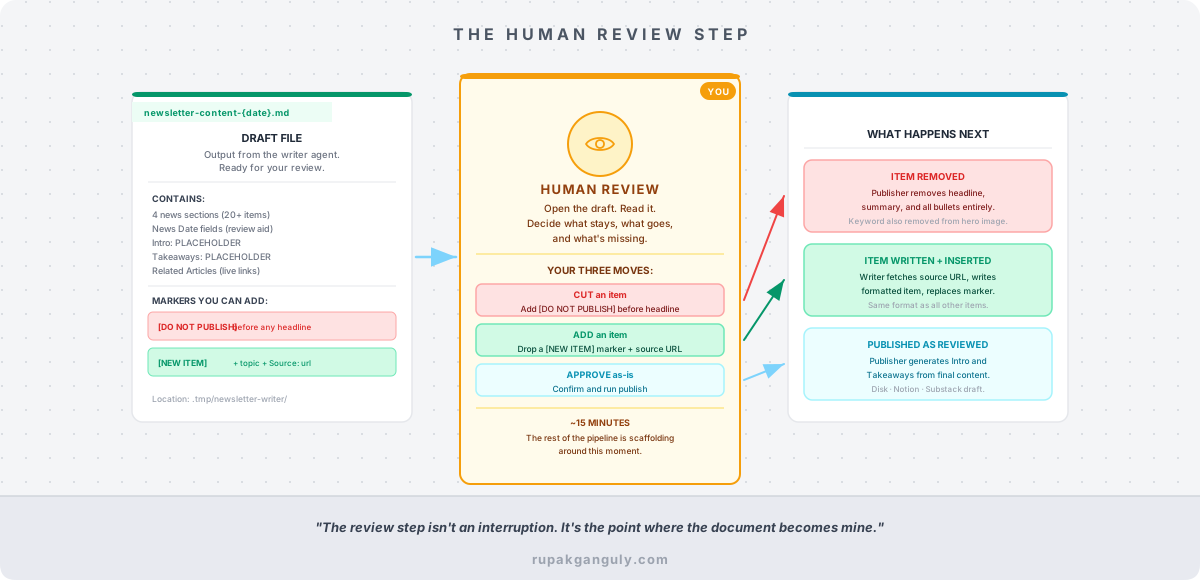
After the writer finishes, the pipeline stops.
This is the design choice people find most surprising. Why not just let it run all the way through?
Because the Introduction and Key Takeaways are generated from the final content. If I cut three items and add two new ones, the Intro needs to reflect that. If the pipeline ran end-to-end without stopping, the published newsletter would describe content that isn’t there, or miss content that is. The review step isn’t an interruption. It’s the point where the document becomes mine.
I open the draft at .tmp/newsletter-writer/newsletter-content-{date}.md. I read it. I cut anything that isn’t worth my readers’ time — I add [DO NOT PUBLISH] before the headline and it vanishes from the final output. I add anything the research missed by dropping a [NEW ITEM] marker with a source URL. Sometimes I do both. Sometimes the draft is exactly right and I confirm it immediately.
That 15 minutes of editorial judgment is where the newsletter actually becomes the newsletter. The rest of the pipeline is scaffolding around that moment.
Agent 3: The Publisher
- File:
.claude/agents/newsletter-publisher.md - Tools: Read, Write, Bash
- Model: Sonnet
The publisher picks up the reviewed draft and does five things before a single byte gets published.
First, it scans for markers and shows me the report. Nothing runs until I confirm. Second, it removes every [DO NOT PUBLISH] item entirely — headline, summary, all bullets. Third, it strips the **News Date:** fields that are visible during review but shouldn’t appear in the final newsletter. Fourth, it fixes sub-bullet indentation: Notion and Substack require 4-space indents for nested lists to render correctly; the draft uses 2-space indents. That was one of the first bugs I hit, and the fix is now baked into the pipeline. Fifth, it generates the Introduction and Key Takeaways from the final, human-reviewed content.
Then it publishes. The destinations are disk (a Markdown file in output/ai-newsletter/), Notion (via a Python helper script that calls the Notion API), Substack (always saved as a draft, never auto-published), or any combination.
The processed file is saved to .tmp/newsletter-publisher/newsletter-content-processed-{date}.md. If I publish to disk first and then decide to push to Notion, the publisher finds that processed file and reuses it. The Introduction and Key Takeaways are identical across both destinations. There’s no drift between versions.
The publisher calls a Python script for external API operations — Notion and Substack require authenticated HTTP calls, and that kind of deterministic work belongs in a script, not an agent prompt. The agent makes the decision to publish; the script executes it.
Agent 4: The Hero Image Agent
- File:
.claude/agents/newsletter-hero-image.md - Tools: Read, Bash, Glob
- Model: Haiku (fastest and cheapest — this is coordination, not reasoning)
After publishing completes, the hero image agent reads the processed newsletter, extracts the keywords line from the header, and filters it. If a [DO NOT PUBLISH] item’s keyword is in the list, it gets removed. Misleading cover image keywords for content that wasn’t published is a trust problem. This agent was the last one I added, after I noticed a keyword for a cut item showing up on the cover of a published edition.
The filtered keywords and the publication date go to a Python script that composites text onto a base image. The base images rotate by ISO week number — consistent within a week, different across weeks. I add new base images by dropping a hero_*.jpg file into assets/newsletter/. The rotation picks it up automatically.
Output lands at .tmp/newsletter-hero-image/latest-in_ai-news_hero_{date}.jpg. I use that file as the cover image when I publish from the Substack dashboard.
What Each Agent Is Not Allowed to Do
The boundaries matter as much as the capabilities.
The researcher doesn’t write. It produces structured data and stops. The writer doesn’t research — unless it’s processing a [NEW ITEM] marker, in which case it fetches exactly the source URL I provided. The publisher doesn’t change news content: it processes markers, fixes formatting, generates the wrapper sections, and publishes. The hero image agent doesn’t modify the newsletter; it reads it and calls a script.
These aren’t arbitrary restrictions. They’re what keeps quality from quietly degrading as the pipeline runs. An agent that can cross into another agent’s territory will, eventually, under the right conditions. And when it does, you won’t see it in the output. You’ll see a newsletter that’s slightly off in a way you can’t immediately diagnose.
Tight scope is the design. The human review step in the middle is the design. The explicit quality checklists at the end of each agent’s instructions are the design.
The pipeline isn’t magic. It’s a set of constrained specialists that each do one thing well, with a human in the middle who decides what actually gets published.
If you missed the intro post I Stopped Writing My Newsletter. An AI System Does It Now., that’s the right place to start. It covers the full system at a high level and explains why I built it the way I did.
Part 1 covers the directive and the 3-layer architecture.
Part 2 covers the skill and how one command drives everything.
In Part 4, I’ll show you what the system actually produces each week, the full list of things that broke along the way, and how the same three-layer pattern applies to any repeating workflow you’re running — not just a newsletter.
If you want to see the newsletter this system produces, subscribe at rupakganguly.substack.com. If you’re building something similar or have hit a wall trying, drop me a message. I’d genuinely like to hear what broke.