
Six months ago, I tried the obvious thing: I pasted my newsletter template into ChatGPT and asked it to research and write the week’s edition.
It gave me something that looked like a newsletter. Professional formatting. Five sections. Even a few bullet points with numbers in them. But it was wrong in ways that were subtle and maddening. It included stories from two weeks ago. It repeated an item I’d covered in the previous edition. The summary and the bullets said the same thing in different words. The tone was off. It didn’t sound like me.
I fixed it manually. And the next week, I did the same thing again. And the week after that.
The problem wasn’t the model. The problem was that I was treating a repeating process like a one-time prompt.

[Part 1 of the 5-part blog series]
If you missed the intro post I Stopped Writing My Newsletter. An AI System Does It Now., that’s the right place to start. It covers the full system at a high level and explains why I built it the way I did.
Why “Just Ask ChatGPT” Fails for Repeating Workflows
There’s a number I keep coming back to: 90% accuracy per step compounds to 59% success over five steps.
That’s not a knock on LLMs. That’s the math of any probabilistic system running without guardrails. If a model gets a fact right 90% of the time, strings five of those judgments together and you’ve got barely coin-flip odds that the output is correct end-to-end.
LLMs are probabilistic. They’re excellent at judgment calls, synthesis, and language. But business logic is deterministic. It has rules. Rules like: “all news items must have a published date within Saturday to Friday of the target week.” Or: “never repeat a headline that ran in last week’s newsletter.” Or: “the summary and bullet points cannot say the same thing twice.”
These aren’t style preferences. They’re quality gates. And quality gates need to be written down somewhere permanent, enforced every single run, not just when they happen to fit inside a prompt you typed this Tuesday.
The mismatch between probabilistic AI and deterministic business logic is the real design problem. Not the model. Not the tools. The architecture.
The 3-Layer Architecture That Actually Holds Up
The system I built to run my newsletter rests on three layers. Each one has a single job.
Layer 1 is the Directive. This is a Markdown file that lives in directives/write_ai_news_newsletter.md. Think of it as the permanent employee manual for your newsletter. It defines the goal, the inputs, the newsletter structure, the tone and voice guidelines, the sources to check, the sources to exclude, what to do during a slow news week, what to do when a story straddles two categories. It doesn’t change week to week. It’s the standing instruction set.
Layer 2 is Orchestration. This is Claude acting as the intelligent decision-maker. Not doing the work. Making routing decisions. Reading the directive, calling the right agents in the right order, handling errors, checking for edge cases. Claude’s job at this layer is judgment, not execution. And because judgment is exactly what probabilistic systems are good at, this layer works.
Layer 3 is Execution. The actual work gets done by Claude subagents and Python scripts. Subagents handle AI-powered tasks: research, writing, publishing. Python scripts handle deterministic operations: date calculations, Notion API calls, hero image compositing. The split is intentional. AI does what AI is good at. Deterministic code does what deterministic code is good at.
The insight that ties it together: push complexity into deterministic code so Claude focuses on decision-making. Every rule you move out of a runtime prompt and into a directive or a script is a rule that will be enforced the same way every single time.
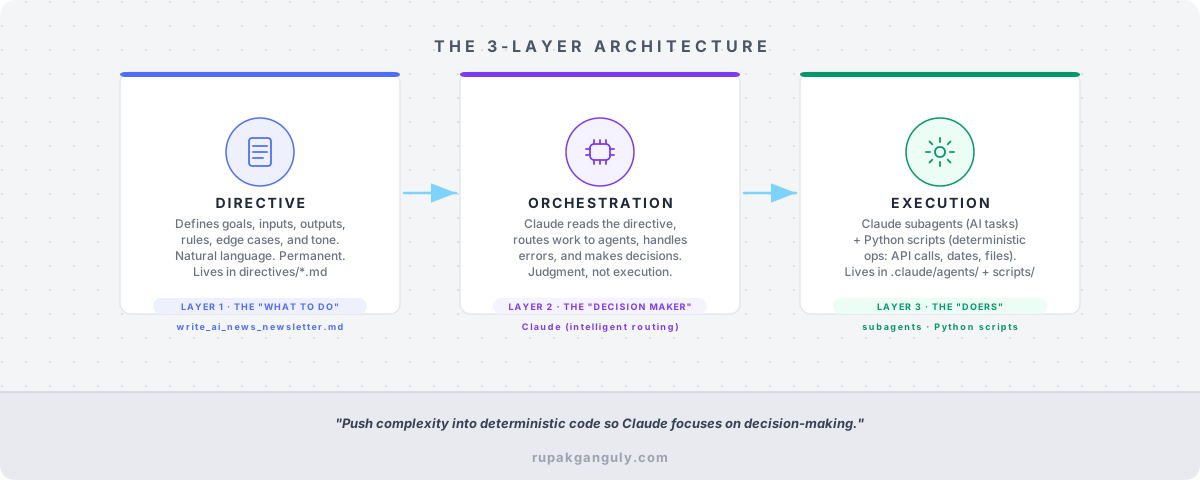
[The 3-Layer Architecture]
Deep Dive: What’s Actually in the Newsletter Directive
The directive file isn’t a prompt. It doesn’t start with “You are a helpful assistant.” It reads more like a policy document that a mid-level employee would use to do their job without having to ask questions.
Here’s what it defines:
The goal and inputs. The newsletter covers AI news from Saturday to Friday of the previous week. The input is a Friday date. The date range is calculated from that date. That sounds simple until you realize that without this explicit rule, the researcher agent will happily include articles from three weeks ago because they happened to come up in a search.
The newsletter structure. Four main sections, defined by category: AI and ML Breakthroughs, Major Tech Company Strategic Moves, Emerging Tech Trends and Potential Impact, Developer Tooling and Automation. Each section has guidance on what belongs there and what doesn’t.
The No Repeat rule. Before gathering any news, the researcher agent reads the most recent processed newsletter from .tmp/newsletter-publisher/. It extracts every headline that ran. Then it excludes all of those items from the new edition, even if there’s follow-up coverage. Readers who follow every week already saw them. Repeating items wastes their time.
The duplication rule. The summary paragraph and the bullet points under each news item must not say the same thing. The summary answers “so what.” The bullets answer “here’s the evidence.” This is written out explicitly with a bad example and a good example in the directive, because without it, LLMs default to restating the summary in bullet form.
Date-range enforcement. Every news item must have a published date within the Saturday-to-Friday window. Items outside that range get excluded. Not softened. Excluded. This is a hard rule, not a preference.
Edge cases. What to do on a slow news week. What to do when a major story breaks mid-week. What to do when a story fits two categories equally. These aren’t hypothetical. They’re documented because they happened.
Excluded sources. Bloomberg, Forbes, Reuters, individual LinkedIn posts (unless from a verified author). Listed explicitly because “use reputable sources” is too vague to enforce.
Tone and voice guidelines. The directive points to two separate files: directives/output-styles/executive.md for newsletter tone, and directives/output-styles/mytonevoice.md for the blog posts. The researcher and writer agents read these before they produce any output.
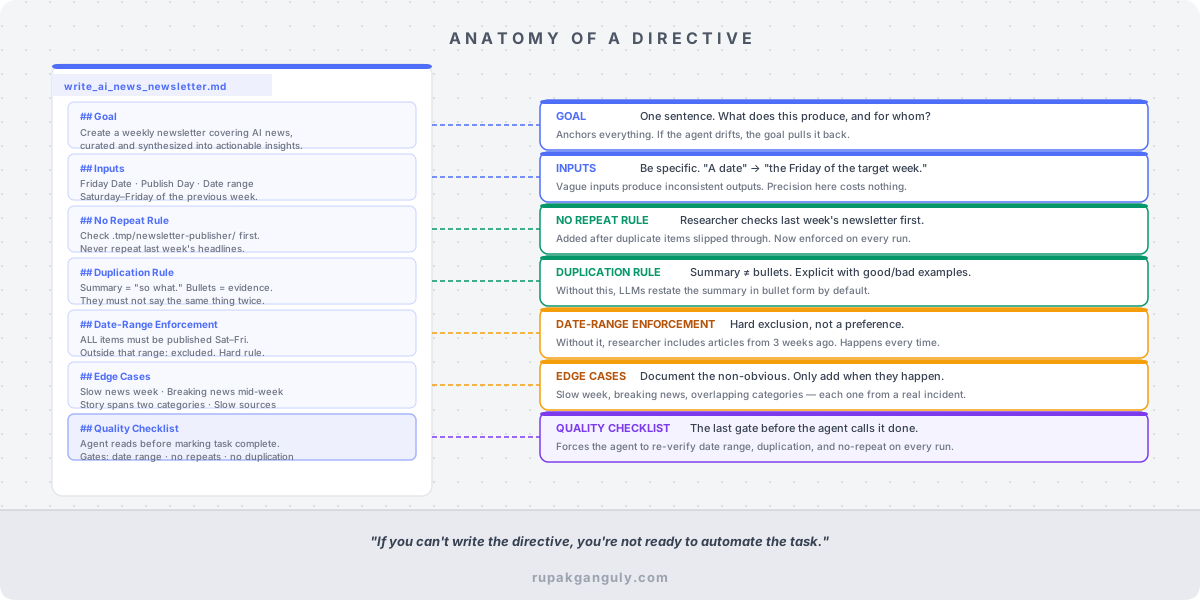
[Anatomy of a Directive]
The Living Document Principle
The directive I have today is not the directive I had in March.
In March, the sub-bullet indentation in Notion and Substack was broken. Items rendered flat, no nesting, everything at the same depth. It looked good on the Markdown published to disk, but broke when published to Notion and Substack. I found the fix: convert 2-space indents to 4-space before publishing. I fixed the publisher agent. Then I documented the fix in the directive so that anyone reading it would understand why that pre-processing step exists.
A few weeks later, I noticed that the researcher agent was pulling items from the previous newsletter and not catching all of them. It was checking the right file, but the exclusion logic was too loose. Fixed the agent’s instructions. Added an explicit note to the directive: “Exclude duplicate coverage — if a news item’s core announcement was covered in the previous newsletter, do not include it even if there is follow-up coverage or ongoing discussion.”
The hero image agent once included keywords from items I’d marked [DO NOT PUBLISH]. That’s misleading: the keyword is on the cover image but the article was cut. Fixed it by adding a keyword filtering step. Added the rule to the directive.
Not every update came from a break. Some came from thinking more carefully about what “good” actually means. The Related Articles section at the bottom of each newsletter pulls links from two places: my Substack archive and my personal blog at rupakganguly.com/tags/ai/.
Early on, the writer agent would just grab recent posts and call it done. But readers who follow every edition started seeing the same blog posts recommended week after week. So I added a rule to the directive: check which blog posts appeared in the previous newsletter, then pick different ones. Also exclude any blog post older than one year. The agent now interleaves Substack editions with fresh blog posts in a rotating pattern, and the selection is different every week without me touching it.
That’s the kind of thing that gets built into a directive when you stop asking “is it working?” and start asking “is it good?”
Every one of these became a permanent improvement. The directive is now the accumulated knowledge of six months of edge cases. The agent running today has all of that context baked in from the first line it reads.
This is what I mean by self-annealing. The system gets smarter because every failure becomes a documented update. Not a workaround buried in a prompt. A standing rule in the instruction set.
How to Write Your First Directive for Any Repeating Task
I’ve started using this same pattern for other workflows: a lead generation pipeline, a blog post series, competitive research reports. The structure that works is always the same:
Goal. One sentence. What does this process produce, and for whom?
Inputs. What does the process need to start? Be specific. “A date” is not as good as “the Friday date of the week being covered, used to calculate the Saturday-to-Friday news window.”
Output format. What does done look like? Include structure, section names, file paths, formatting requirements. If the output goes somewhere specific (Notion, Substack, disk), define where and in what format.
Tone and voice. If this process produces written content, point to voice guidelines. Don’t embed them in the directive. Keep them in separate files that multiple processes can reference. Rinse and repeat using more examples from my new articles look like. Keep enhancing, keep refining.
Rules and quality gates. This is where most directives are too thin. Write out every rule you’d catch yourself enforcing manually: the no-repeat rule, the date-range check, the duplication check, the excluded sources. If you’ve ever fixed something manually more than once, that fix belongs in the directive.
Edge cases. Document the non-obvious situations. Slow week. Major breaking news. Story that spans categories. Rate limit on a source. What does the right behavior look like in each case?
A quality checklist at the end. The agent reads this before it considers the task complete. It’s a forcing function to catch the things that are easy to skip. My newsletter directive’s checklist includes: verify all news items have a published date within the week’s range, verify no items duplicate last week’s newsletter, verify the summary and bullets don’t repeat each other, check the tone guidelines one more time and remove any AI slop.
What This Changes
The first time I ran the system and walked away while it researched, wrote, and produced a draft that was actually good, I felt something close to relief. Not amazement. Relief.
Because it had been a grind. Not the thinking part. The mechanical overhead around the thinking part. The checking, the formatting, the de-duplicating, the worrying about whether I’d missed something.
The directive offloaded all of that. The thinking still happens, by me, when I review the draft. But the mechanical scaffolding runs itself.
That’s the real shift. You’re not delegating your judgment. You’re delegating the process that surrounds your judgment. And to delegate a process, you have to write it down. You have to understand it well enough to put it in a document that a mid-level employee could follow without you in the room.
If you can’t write the directive, you’re not ready to automate the task. You just don’t know the process well enough yet.
If you missed the intro post I Stopped Writing My Newsletter. An AI System Does It Now., that’s the right place to start. It covers the full system at a high level and explains why I built it the way I did.
In Part 2, I’ll go deep on the skill: the single /ai-newsletter command that activates the entire pipeline. It has a command tree with 10-plus sub-commands, a Draft-First Check that prevents wasted work when you’re iterating on a draft, and a marker system that lets you control the draft with editorial annotations. You’ll also see how natural language works just as well as the slash commands, and why that matters for anyone who isn’t an engineer.
If you want to see the newsletter this system produces, subscribe at rupakganguly.substack.com. If you’re building something similar or have hit a wall trying, I’d genuinely like to hear what broke.